A worker with persistent neck pain does not necessarily need an expensive chair. Equally, a well-designed workstation will not resolve symptoms driven by workload, poor sleep, migraine, inflammatory disease or anxiety. A useful workplace ergonomics guide starts with that clinical reality: ergonomics is about the fit between a person, their task, their equipment and their working environment.
For Occupational Health professionals, the aim is not to produce a generic checklist or prescribe equipment from a distance. It is to identify relevant risks, understand functional impact, support sustainable work and give proportionate, defensible advice. That requires observation, clinical reasoning and a clear understanding of what sits within an OH recommendation versus a manager’s responsibility to implement controls.
Ergonomics considers whether work can be performed safely and comfortably by the people expected to do it. In office-based work, this may involve display screen equipment, posture, keyboard and mouse use, lighting, noise and the pattern of breaks. In clinical, laboratory, manufacturing or logistics settings, it may involve force, repetition, awkward postures, manual handling, work pace, vibration, reach distances and the physical layout of the task.
The common mistake is to treat posture as the whole issue. There is no single perfect posture that can be held indefinitely. The more useful principle is variation. A workstation that permits movement, task rotation and timely breaks is usually more valuable than one arranged around rigid instructions to sit upright all day.
This matters in OH because musculoskeletal symptoms often have multiple contributors. A report should avoid implying a diagnosis where there is none, or suggesting that a workstation adjustment alone will cure a complex condition. Instead, relate the assessment to work function: what tasks aggravate symptoms, what capacity remains, and which changes are likely to reduce avoidable exposure.
A sound assessment begins with the work, not the catalogue of available equipment. Ask the worker to describe a typical day, including the tasks they find most difficult, their hours, work locations and opportunities to vary activity. Hybrid workers may use a well-equipped office twice a week but work from a sofa or dining table on other days. The relevant exposure is the real pattern of work.
Take a focused occupational history. Establish the site and nature of symptoms, onset, variation during and after work, treatment received and any red flags requiring clinical review. Then explore function. Can the person type, use a mouse, take calls, lift, stand, drive, inspect equipment or sustain concentration? Which tasks are limited, and for how long?
Avoid assuming causation simply because symptoms occur at work. It may be appropriate to say that prolonged screen work appears to aggravate existing symptoms, while recognising that this does not establish the workplace as the sole cause. This distinction is clinically honest and helps keep reports proportionate.
Where disability may be relevant, focus on the practical disadvantage created by the role and potential adjustments that may reduce it. OH can advise on functional effects and likely helpful measures; legal decisions rest with the employer. Recommendations should also respect confidentiality. Managers usually need to know restrictions, timescales and adjustment options, not detailed diagnostic information.
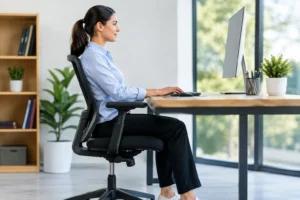
A brief workstation review can reveal more than a symptom questionnaire. Look at screen height and distance, keyboard and mouse position, chair adjustment, desk depth, foot support, glare, headset use and frequently used items. Observe whether the worker is reaching repeatedly, twisting, elevating the shoulders or holding the wrist in sustained extension.
For non-screen work, watch the task where possible. Consider load weight and shape, grip, lifting frequency, carry distance, available space, force applied, work height, pace and recovery time. A task that is acceptable for ten minutes may not be acceptable for a full shift with limited breaks.
Environmental factors deserve attention too. Poor lighting can lead to forward head posture and visual strain. Cold environments may increase discomfort and reduce dexterity. Excessive noise can make headset use or communication more demanding. Ergonomic risk is rarely confined to one piece of furniture.
The best recommendations address the source of avoidable strain and make the safer choice easy to maintain. Start with task and workplace design before relying on the worker to compensate through willpower or constant self-correction.
For display screen work, practical controls may include adjusting the chair so feet are supported and the desk can be approached closely; positioning the screen directly ahead at a comfortable viewing height; bringing the keyboard and mouse within easy reach; and using a separate keyboard, mouse and screen where laptop work is prolonged. A laptop stand alone is not usually enough if it forces the user to choose between an appropriate screen height and an appropriate keyboard position.
A headset can be a sensible adjustment for someone who frequently takes calls while typing, rather than cradling a phone between shoulder and ear. A vertical mouse, trackball or compact keyboard may help some individuals, but not everyone. Equipment trials should have a defined purpose, sufficient time for familiarisation and a review point. More equipment is not automatically better equipment.
In physically demanding roles, controls may include changing the work height, introducing mechanical aids, reducing carry distances, separating heavy and light work, rotating tasks, adjusting staffing or revising workflow. Training remains useful, but it is weaker as a sole control when the system still requires repeated high force or awkward lifting.
Short, regular changes of position are more realistic than advising a person to take one long break after hours of static work. Encourage workers to alternate sitting, standing and walking where the role permits, vary screen-based tasks with other duties and make use of natural pauses between calls or appointments.
However, standing desks are not a universal answer. Prolonged standing can aggravate lower limb, back or vascular symptoms, and may be unsuitable in some circumstances. The benefit is the ability to vary posture, not standing for an entire shift. This is a useful example of why individual assessment matters more than fashionable equipment.
Workload must also be considered. A worker may have an excellent chair but no capacity to take breaks because of call targets, understaffing or back-to-back clinics. In such cases, an ergonomic recommendation that ignores work organisation will have limited effect. A temporary reduction in intensive keyboard work, protected microbreaks or task rotation may be more meaningful than another accessory.
OH advice is most useful when it translates assessment findings into specific actions. Avoid vague wording such as provide ergonomic support. State what should be assessed, trialled or changed, who should be involved and when the arrangement should be reviewed.
For example, a defensible recommendation might advise a formal workstation assessment, provision of a separate monitor, keyboard and mouse for regular home working, and a four-week review of symptom response. If the worker is unable to sustain continuous keyboard work, specify a temporary tolerance-based approach, such as planned variation of duties rather than an arbitrary instruction to take breaks.
Be clear about uncertainty. If symptoms are severe, progressive or associated with neurological deficit, ergonomic changes should not delay appropriate medical assessment. If a worker reports pain but remains functionally capable, recommendations may focus on prevention and self-management rather than unnecessarily restricting work.
An adjustment is only successful if it is used, tolerated and relevant to the task. Arrange review after a reasonable period, particularly where there are ongoing symptoms, safety-critical duties, sickness absence or a proposed phased return. Ask whether the worker can sustain the required tasks, whether symptoms have changed and whether new barriers have appeared.
This review also protects against a common failure mode: equipment is delivered, but no one checks whether it fits the workstation, has been adjusted correctly or works in the employee’s actual setting. For hybrid arrangements, the worker may need guidance and responsibility to set up their home workspace safely, while the employer remains responsible for managing foreseeable work-related risks.
For practitioners building confidence in this area, structured case-based learning is especially valuable. It develops the ability to move beyond a checklist and explain why a recommendation is relevant, proportionate and clinically defensible. Zosh Occupational Health Academy approaches these decisions through practical scenarios that connect workplace observations with fitness-for-work advice.
A good ergonomic assessment does not promise a pain-free workplace. It gives the worker and employer a clearer route to safer, more sustainable work – one based on the task in front of them, the person doing it and the changes that can genuinely be maintained.